
Building an AI-powered pipeline to process returns
We built a pipeline to automatically read return forms, processing 81% of a batch without human review. AI agents perform multiple roles within the pipeline to improve accuracy.
In this note · 4 sections
Every day, our client received a hundred scanned return forms of various shapes. For each form, they:
- Read the original document.
- Searched for the original item in their ERP system, and located each returned item. For each item, they determined the quantity returned and whether to restock.
- Created three transactions to authorize, receive, and credit the return.
We designed a pipeline to shorten each step: read the original document, compare details against a suggested return process, and approve.
The overall pipeline
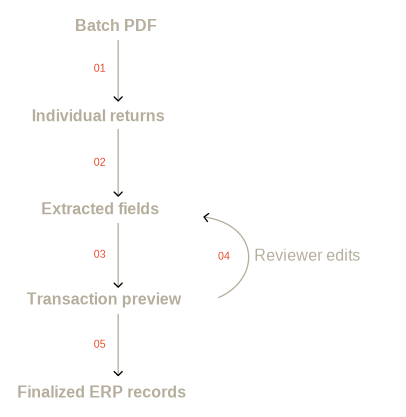
Starting from a single PDF batch of concatenated returns, the complete pipeline reads, splits, and produces transactions from these returns.
- Traditional and agentic tools split a batch into individual returns.
- For each return, a Claude session reads and extracts printed fields.
- Dry run all transactions, validating the extraction and producing a preview.
- Based on the validation results, humans and agents correct misreads while referencing the original document.
- A human reviewer examines the original document, its extraction, and the preview, then approves the transactions for posting.
To safely and accurately evaluate its performance, we needed to run the pipeline without relying on side effects in external systems. In practice, this meant front-loading all computation in stages 1-4, before writing to the ERP. As an added benefit, a reviewer can now preview the final transactions, exactly as posted.
Splitting a batch
The first step is to split a 300-page batch into individual returns. While a human reviewer can easily divide the batch into complete returns, the task requires a careful reading of each page’s content. Oversplitting leaves multiple groups incomplete, and overmerging puts contradictory information in the same document. These issues can only be detected after reading the content itself, but we don’t want to spend tokens to extract all the data yet.
Instead, we take advantage of an existing pattern to draw tentative groups. About 70-80% of returns in a batch follow the same two-page template, and remaining pages are often part of one of these groups. Once we can draw these easy groups, an agent only fixes contiguous runs of unmatched pages.
Full process:
- Use a cheap OCR tool, Tesseract (opens in a new tab), to read free text from each page.
- Classify page templates based on highly visible header text.
- Some templates are only used once per return. Form a tentative group for each.
- Some templates are boilerplate information and contain no identifying information. Add these to the previous group.
- For each remaining island of unclassified pages, run an agent to match details and form remaining groups.
The agent segments 99% of all groups correctly, usually oversplitting 1-3 returns per batch.
Processing a single return
To process a return, a human would work within their ERP system:
- Find the original sales order, based on a written number or the customer’s details.
- Find and select the returned line items.
- Create new transactions to authorize and credit the return.
A single agent could handle this task in theory, but we didn’t want to entrust an agent with full control over the end result. This motivated two decisions:
- Only direct the agent to read pages, not plan the transactions directly.
- Implement planning as a deterministic procedure.
Creating the first draft
For an initial read, we give the agent a simple task: given the data on the page, read and output structured details, such as the customer name and returned quantity, and construct a first draft. This agent is given one prompt and one tool.
The prompt contains information needed to understand the document and correlate its content and formatting with the output shape. It includes:
- The original PDF
- Instructions: read and extract data
- Common patterns and examples for each field
- Common extraction mistakes to avoid
- Custom business rules
When finished, Claude outputs a complete draft through its sole tool:
- Write complete extraction data, as validated by Zod (opens in a new tab).
Using a second prompt for weaknesses
Even with prompt guidance, Claude consistently failed to read certain elements: a single large letter, sometimes on other pages or turned upside-down; or a stamp on the page with a secondary form with circled options. We could slightly improve performance by emphasizing these details in the prompt, but, as we extended the prompt further, the agent ignored these details again.
For these specific tasks, we instead call a second AI to make a focused extraction. Unlike the first session, this one does not apply business rules to interpret content. Rather, its sole job is to read and transcribe data in hard-coded forms, even if there are duplicates. This AI is agentic and can access a set of detail-oriented tools:
- Read a section of the original page, with optional cropping and rotation.
- See sample images of a handwritten mark and its position. Claude especially struggled to read isolated letters, interpreting the writing as “loops” as “straight lines” rather than a letter.
- Reply with a reading of individual handwritten letters, circled options on the stamp, and handwritten line items.
Once the exact data has been transcribed, we choose the form with the highest precedence and correct the original extraction. This logic is deterministic and lies entirely in testable code.
With this step working, we removed the excess prompt guidance from the first agent, letting it focus on its main task.
Agent-driven correction
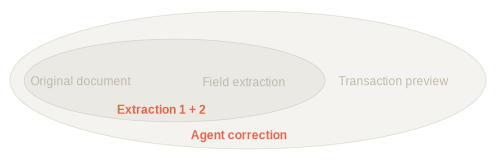 Data available at each stage of processing a return
After the initial extraction round, 69% of documents end up ready and exact. Some remaining errors caused immediate failures when attempting to preview transactions:
- Reading the wrong field as a customer name
- Reading the wrong field as a patient name
- Reading free text as an SKU
- Failing to include numeric IDs and suffixes.
Other issues demanded flexibility in the preview itself:
- Some returns don’t include a sales order number, just the customer and shoes.
- Returns rarely specify the entire line. Some returns only include the original order’s style name.
With a highly flexible preview, it was possible to reach 80% accuracy on a test batch at this stage. However, this preview’s code was built to fix individual cases, and it quickly became unmaintainable.
Though we didn’t want an agent to directly plan transactions, there was value in simplifying the code and letting an agent handle the rest. We kept a simpler preview, and, for the final step, an agent checks the preview to correct a misread extraction. This agent has a larger toolset:
- Read a section of the original page, with optional cropping and rotation
- Validate and preview the derived transactions.
- Edit the extracted data
- Read select ERP tables
After this step, 81% of an evaluation batch’s returns were ready and exact. In practice, the agent generally obeys its restrictions and only writes information present on the original PDF. We even skip this step when an extraction already passes validations.
About evaluating the pipeline
As we developed the pipeline, we constantly evaluated its performance on a handful of training batches. Because our pipeline operated end-to-end, we could use real and synthetic PDFs and ERP records as ground truth. We also hand-labeled solutions for segmentation and rotation.
We further subdivided the pipeline into smaller steps, each of which reported its results, run time, and token usage. Reusing saved results from earlier stages let us cheaply re-evaluate later stages, particularly those that involved the preview.