
Shipping a Sage Intacct Integration for Float
What we learned building Sage Intacct support for Float’s spend platform: identity across three systems, Canadian tax, and multi-entity accounting.
In this note · 8 sections
Float is a spend management platform used by Canadian finance teams. Its customers issue cards, pay bills and reimburse employees in Float, while their accountants close the books in an ERP. Between August and October we built Float’s integration with Sage Intacct, working inside Float’s codebase alongside their accounting team, and it shipped as 79 pull requests across the Django backend and the React frontend.
This post walks through the architecture and the four problems that took most of our time.
What it does
Every flow follows the same path. A Float user codes a transaction with its GL account, vendor, tax and dimensions, and Float exports it to Sage as the matching record. We recorded this demo for Float’s team on August 31, the day our first export landed in Sage. A card transaction is coded in Float, exported, and then opened in Sage as a credit card transaction.
Architecture
Float does not call Sage directly. It goes through Merge, a unified accounting API that keeps a cached copy of each customer’s Sage data and proxies writes to Sage’s XML gateway.
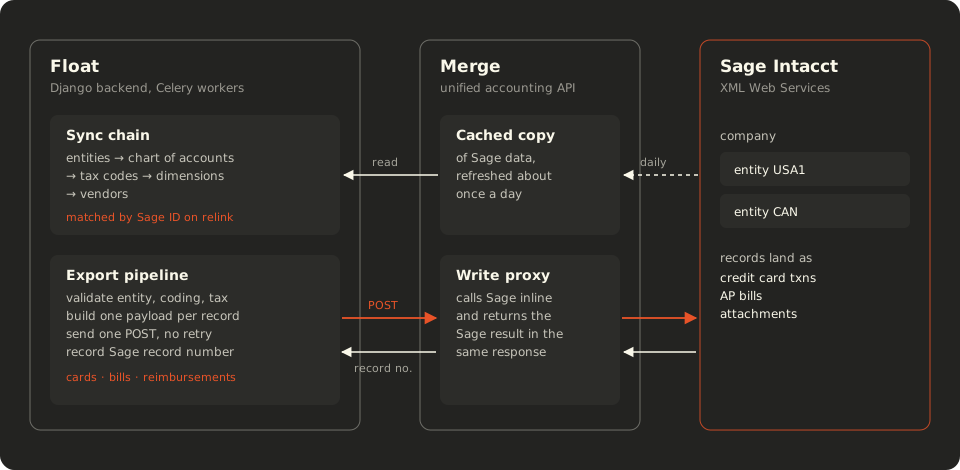
Inside Float, Sage is one more provider beside QuickBooks, Xero, NetSuite and Dynamics. A Celery chain syncs reference data in dependency order, starting with entities, because every other record is either shared across entities or owned by one. Exports run through the same pipeline as every other provider: validate the record, build one payload for it, send it, and store the result.
We made one decision early that shaped everything after it. Before building anything specific to Sage, we looked for the place where another provider already solved the same problem and followed that shape. As a result the integration reads like the rest of the codebase, and reviews went faster.
Writes are synchronous
Our original plan assumed that Merge wrote to Sage asynchronously, which would have meant webhooks, a reconciliation job and a pending state on every export. Before building any of that, we tested the assumption against a live Sage sandbox.
The writes came back synchronously. Sage’s record number arrived in the response body, and rejections came back as HTTP 400 responses carrying Sage’s own error code. That one test removed the reconciliation subsystem from the design. It also let us store Sage’s record number as the accounting ID, so an accountant sees the same number in Float and in Sage.
Bills work the same way. A bill entered in Float lands in Sage as an accounts payable bill, with its vendor, dates and amount intact.
Two IDs for every record
Every record Merge returns carries two IDs: Merge’s own, and the ID in Sage. Float stored only the first. During live testing, a reconnect created a new Merge link to the same Sage company, and every coded transaction lost its GL account, vendor and dimensions in one sync.
We reproduced it with two links to one sandbox company. All 580 reference records came back with new Merge IDs, while every Sage ID stayed the same.
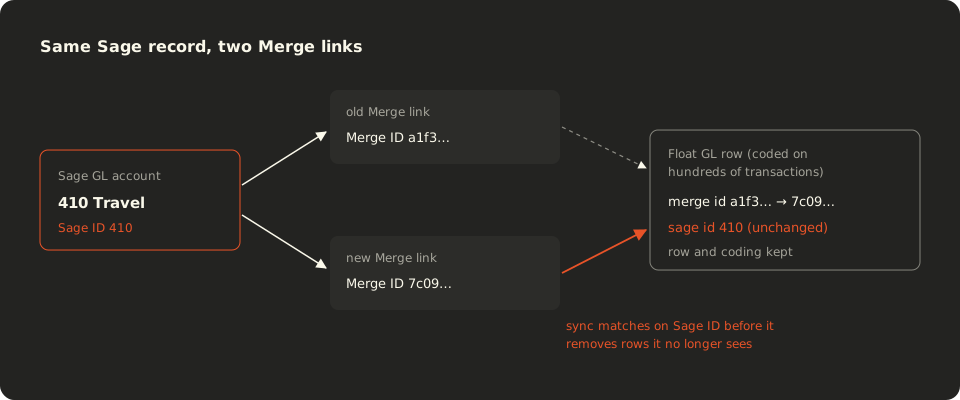
The fix stores the Sage ID beside the Merge ID. When sync meets a Merge ID it has never seen, it first looks for an existing row with the same Sage ID and updates that row in place, and only then removes anything missing from the feed. A pin on the Sage company ID keeps the matching inside one company, so a reconnect can never adopt another company’s rows. We verified it end to end: the same 580 rows survived the reconnect, and a bill coded before it exported cleanly through the new link.
Canadian tax arrives without its parts
Canadian sales tax has parts that post differently. GST is recoverable and goes to a tax asset account, while PST in British Columbia, Saskatchewan and Manitoba is not recoverable and belongs in the expense itself. Float models this by treating a tax code as a set of components, each posting to its own account.
Merge returns every Intacct tax rate with an empty component list. We checked all 197 rates in a sandbox company to be sure. With no components, Float’s tax calculation had nothing to allocate, so the integration now gives each rate a single component at its rate and keeps that component’s GL mapping stable across syncs.
One beta customer needed more. Under a public-sector rebate, half of their 5% GST is recoverable and the other half is part of the expense. A Merge expense line carries one tax rate and no tax amount, so Sage’s tax engine has no way to express that split. Instead we borrowed the approach Float already uses for NetSuite: the tax posts as extra GL lines beside the expense, each line carries a zero-rate tax code so Sage accepts it, and the behaviour is switched on per tax code. Before calling it done, we read every variant back from Sage, across cards, bills and reimbursements, and on fixed accounts as well as the line’s own expense account.
Multi-entity reaches every screen
Many Sage Intacct companies contain several legal entities. Each GL account, vendor and dimension value is either shared or owned by one entity, and once a company has two entities, Sage rejects any write that does not name one.
That rule touched more of the product than we expected. Float syncs the entities along with the ownership of every reference record, and its pickers offer only the values that are valid for a record’s entity. Export validation stops a record that has no entity, a disabled entity or another entity’s coding before Sage ever sees it. Bulk edit across many transactions offers only values that are valid for every selected entity, and clearing accounts are configured per entity and currency.
The transitions were harder than the steady state. A company with a single entity posts at the top level and needs no entity at all. When it adds a second one, it moves from one rule to the other overnight, and every unexported record needs an entity before it can go out. We documented that case for Float’s support team and left the product decision with them.
Beyond the code
Integrations often stumble at launch for reasons that have nothing to do with code: an accountant who cannot tell which account a refund will hit, or a setup step nobody wrote down. We spent time on those as well.
When the multi-entity beta opened, we joined Float’s customer office hours and answered accountants’ questions live. Before each session we wrote a one-page brief of likely questions with plain answers, so Float’s team could reuse it after we left. When a customer asked to apply a Float payment to a bill already in Sage, we wrote the implementation spec for Float’s engineers that same afternoon. Multi-entity support itself began as a spike item in the original scope and grew into a full feature, because the first beta customers needed it.
Every pull request we opened stated the bug, how to reproduce it on master, and how we proved the fix. Fixes that touched an export cited the Sage records that verified them. At the end we wrote a handoff guide for the engineers who own the integration now, covering the architecture, a support runbook, the monitors we recommend and every known limit.
Conclusion
Very little of this work was API calls. Most of it was finding the places where three systems disagree about identity, sign and time, and then proving the result in the ledger. If your team is building or rescuing an accounting integration, we would like to hear about it.