
Our 15 MB upload limit never worked
Next.js quietly cut our uploads to 10 MB and turned the size error into a generic 500. I measured 160 requests on Next 16 to see what each limit does, and what our fix still leaves broken.
In this note · 6 sections
I wrote the fix in July. Ahmed Panju later built a separate upload path for large videos, which comes up at the end.
On July 28 I asked whether our studio could take 50 MB uploads instead of 15 MB. The studio is the CMS behind xors.xyz. We write blog posts in it, and since the day before, we’d also been using it to build outreach pages, each one built around a short personal video for a prospect. A 15 MB cap is tight for video, so it seemed like a small change. It turned out the 15 MB cap had never worked.
I knew server actions have a 1 MB body limit by default, so I raised that to 52 MB along with our own cap. Then I made a 20 MB test file and posted it on my machine as a server action request to the studio’s sign-in page, the one studio page a script can reach without a session. The dev server printed this:
Request body exceeded 10MB for /studio/login. Only the first 10MB will be available unless configured.
Error: Unexpected end of form
 ⨯ uncaughtException: Error: Unexpected end of form
“Unexpected end of form” comes from busboy, the multipart parser inside Next. It means the body stopped before its closing boundary, and it says nothing about size. The warning above it explained the failure: something had cut my 20 MB body down to 10 MB before the action read it. With the parser limit already raised, that was the only error left.
Every upload over 1 MB would have failed before our 15 MB check could run, ever since we launched the CMS on July 14 (PR #8). That included the video upload on the outreach pages we’d shipped the day before.
I can’t say how many uploads it cost us, because files have been removed from our media bucket since (the test image from the CMS launch PR is gone). The first video we know of is a 30.2 MiB MP4, written six minutes after the fix merged, and it is still the only video in the bucket.
Two limits run before your code does
Our studio uploads a file by calling a server action with a FormData. Next sends that as a multipart POST to the page’s own URL. Before our action sees a byte, the request passes two size checks we hadn’t configured.
The first belongs to the proxy. Next 16 renamed middleware to “proxy” (the old middleware.ts file name still works, with a deprecation warning), and ours ran on every /studio path to check for a login cookie. Whenever a proxy runs, Next buffers a copy of the request body so both the proxy and the route can read it. That buffer is capped by experimental.proxyClientMaxBodySize, 10 MB by default. Past the cap, Next keeps the first 10 MB, logs a warning and hands the short body to the route. The docs (opens in a new tab) say this is deliberate: “The request will not fail or return an error to the client.”
Behind it sits the server action parser, with experimental.serverActions.bodySizeLimit at 1 MB by default. Past that, the parser throws Body exceeded 1 MB limit, an error object carrying a 413 status code. The response still goes out as a 500. Next’s action handler has a comment about exactly this: “TODO: consider checking if the error is an ApiError and change status code so that we can respond with a 413” (server/app-render/action-handler.js, in both 16.0.10 and 16.4.4).
Here is what a 20 MiB upload looks like with neither limit set. Next counts a megabyte as 1,048,576 bytes for both, and I use the same unit (MiB) from here on.
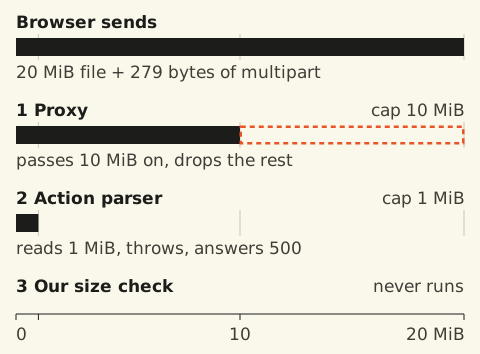
With no config, a 20 MiB upload is cut in half by the proxy and then rejected by the parser after the first 1 MiB. Our own check never runs.
With no config, the log for this upload has both lines: the 10 MB truncation warning and the 1 MB parser error. The parser error is the one that fails the request, so it’s the one I’d fix first. Raise it and leave the proxy alone, and the same upload gets past the parser and dies on the truncated form.
In July, my first try at raising the proxy limit didn’t work. The full warning (trimmed above) ends with a link to a docs page named middlewareClientMaxBodySize, so I put that key at the top level of next.config.mjs, and the next upload was still cut at 10 MB. The key belongs under experimental. Next’s config schema accepts both names only under experimental. In the repro below I tested the current name, proxyClientMaxBodySize, at the top level: next build prints “Unrecognized key(s) in object: ‘proxyClientMaxBodySize’”, finishes anyway, and every upload behaves as if the key weren’t there.
No size ever got a 413
None of the 160 requests I measured for this post got a 413. The PR in July described these limits from what I saw in the logs; this time I measured them. The repro is a fresh Next 16.0.10 app, the version xors.xyz runs, built the same way as our studio: a middleware.ts matching /studio/:path*, a page under it, and an upload action with our 50 MiB check copied from the PR. I built it for production and ran it with next start. A script sends the same multipart request the Next client sends for uploadAction(formData) at ten sizes and saves what came back next to what the server logged.
I ran it with no config, with only the action limit raised to 52 MB (where I was halfway through the fix), and with both limits raised (PR #12). A fourth config put proxyClientMaxBodySize at the top level, as described above; it behaved exactly like the second. Four configs, ten sizes, two routes (the second comes up below) and two Next versions make 160 requests.
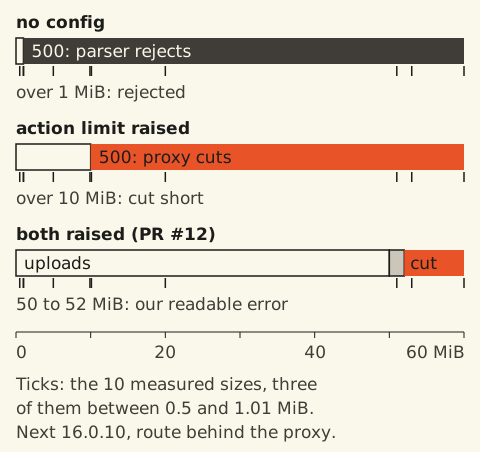
White: the upload worked. Dark grey: the action parser rejected it. Orange: the proxy cut it short. Both of those answer with the same generic 500. Light grey: our own readable error. Raising the limits moves the failures to the right, and above 52 MiB they’re still there.
Behind the proxy, every failure was an HTTP 500, and in the browser every one of them threw the same text: “An error occurred in the Server Components render. The specific message is omitted in production builds to avoid leaking sensitive details.” Our studio editors called the upload actions inside startTransition with no try, and in July the site had no error boundary. In the repro, a 5 MiB upload made that way replaces the whole editor with this:

A 5 MiB upload from a studio-style editor in the repro, with no config. The digest is the only thing on the screen that links it to the server log.
I reran all of it on Next 16.4.4, the latest release on November 2. Behind the proxy, every size got the same outcome and the same 500 as on 16.0.10.
The second route is a control that the proxy doesn’t match. Nothing there was ever truncated. Per version, 14 of its requests were over the action limit, and they failed differently. On 16.0.10, 5 got a 400 and 9 lost the connection. On 16.4.4, 10 got a 500 and 4 lost the connection. My guess, which I haven’t tested, is a race between the server’s early answer and the client still sending.
The fix, and what it leaves broken
PR #12 sets both limits to 52 MB, so our own check is the one that decides. Code comments are trimmed:
const nextConfig = {+ experimental: {+ serverActions: {+ bodySizeLimit: "52mb",+ },+ proxyClientMaxBodySize: "52mb",+ },// app/studio/actions.ts, uploadImageAction (the outreach video action has the same check)const MAX_UPLOAD_BYTES = 52_428_800 const file = formData.get("file")if (!(file instanceof File) || file.size === 0) { return { error: "Pick a file to upload." }}if (file.size > MAX_UPLOAD_BYTES) { return { error: "File is over the 50MB limit." }}Our check allows 52,428,800 bytes and the transport limits allow 54,525,952. The 2 MiB gap is for the multipart wrapping, which added 279 to 281 bytes per request in my runs. Next’s docs (opens in a new tab) suggest leaving 10 to 20 KB, so 2 MiB is generous. It means a 51 MiB file reaches our code and gets a sentence back.
A 53 MiB file still fails the old way. The proxy cuts it at 52 MiB, the parser sees a broken form, and the person gets the generic error. The fix for that has to happen in the browser: check file.size before calling the action, and catch a thrown action. The studio’s image and outreach video uploads on main still do neither, and that’s an open item for us.
I checked the log line, not the screen
The whole change, from my question to the merged PR, took 13 minutes. That was fast enough that I checked that a log line changed and never tested what a person would see. The PR says anything over 1 MB “413’d”, and I never saw a 413.
Here is what I did check. I posted 20 MB and 60 MB files to the login action on the studio’s sign-in page, first on my machine and then in production. That action answers 500 to any file, so the status codes told me nothing. The logs did: the 60 MB probe printed “Request body exceeded 52MB”, and the 20 MB probe printed no truncation warning.
So I knew the proxy limit had moved. I didn’t know what an editor would see, or that 53 MiB would still crash.
The body cap follows the proxy matcher
In October Ahmed built an upload path for the studio’s new video posts that doesn’t use a server action (PR #146). The browser splits a file into 16 MiB parts and sends each part to a route handler at /api/studio/upload, which passes it to the bucket. That editor takes videos up to 5 GB, and the PR notes that the route “sits outside the studio proxy and its body cap”.
On November 2 that stopped being true. Ahmed’s SEO work (PR #164) made middleware.ts match every path, so it can send alias hosts to xors.xyz. The 52 MB buffer cap now applies to every POST on the site, the upload route included. The 16 MiB parts stay well under it. A part size above 52 MiB would now be cut short the same way.
What I’d check on Monday
If you upload through server actions on Next 16, here is what I’d do:
- Set
experimental.serverActions.bodySizeLimitandexperimental.proxyClientMaxBodySizetogether, both underexperimental. - Keep your own size check a little below both, so it’s the one that answers.
- Check
file.sizein the browser and wrap the action call intry. Past the transport limits, the server can’t send the person anything readable. - Search your logs for “Request body exceeded”. It’s the only line that names the cause.
- Whenever you change your proxy’s matcher, list the routes that take request bodies. They get the cap too.
For files bigger than a few tens of megabytes, I’d skip server actions and do what Ahmed did: send parts to a route handler or straight to the bucket.